
Shopify accessibility statement guide
Quick answer: an accessibility statement tells shoppers you care, how to reach you when something blocks them, and what limitations you already know about. AccessiWidget gives you an editable statement page. You must keep the wording honest. Publishing a statement is not a compliance claim.
Shoppers who hit a barrier look for a clear next step, not a wall of legal jargon. A good statement feels like a human hand on the shoulder: here is what we are doing, here is how to contact us, here is what we still need to fix.
What an accessibility statement is
According to the W3C Web Accessibility Initiative (WAI) guidance on developing an accessibility statement, statements help you show users you care about accessibility, give them information about the accessibility of your content, and demonstrate commitment and social responsibility. In some places a statement may also be required by policy. The W3C list of Web Accessibility Laws and Policies can help you identify rules that may apply to you.
WAI also stresses that statements are written for users. Prefer plain language. For example, say videos do not have captions rather than quoting a success criterion number. Statements are not technical assessments or declarations of conformity, though they can refer to evaluation work for credibility.
What to put in one
W3C WAI says accessibility statements should contain at least:
- A commitment to accessibility for people with disabilities
- The accessibility standard applied, such as WCAG 2.2
- Contact information in case users encounter problems
WAI also advises including:
- Any known limitations, to avoid frustrating users
- Measures your organisation takes to support accessibility
- Technical prerequisites such as supported browsers
- Environments where the content has been tested
- References to applicable national or local laws and policies
You can draft a starting point with the W3C WAI Accessibility Statement Generator. Fields are optional. WAI states that information you enter is not stored outside your browser. Download the result, then customise it for your Shopify store and any legal review you need.
How the editable AccessiWidget statement page works
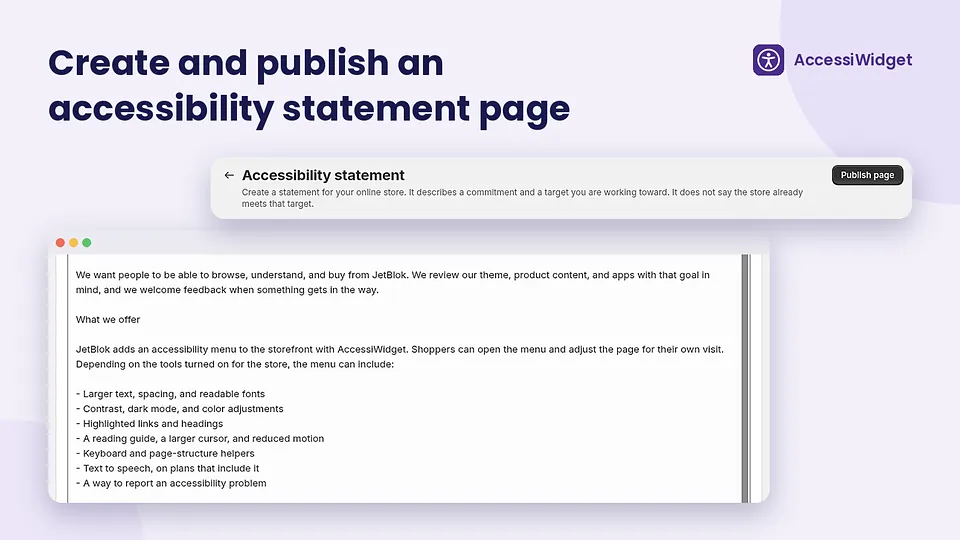
AccessiWidget includes a merchant tool for publishing an editable statement page from the app. Use it to host the copy you approve, link it from your footer or help areas, and update it when you fix issues or learn about new barriers.
Keep it honest. Do not claim your store meets a legal standard or a WCAG level unless your own evaluation and advice support that wording. Do not treat the presence of the widget as proof of compliance. AccessiWidget helps shoppers adjust the storefront and helps you publish a statement. It does not replace audits, theme fixes or legal advice.
Pair the statement with the store scan so known issues in your copy match what you have actually reviewed, and with the features overview so you describe the widget accurately as a helper tool.
Where to link it
W3C WAI recommends making statements easy to find, with links from places such as the footer, help menu, sitemap and about page, using a consistent link name. On Shopify, a footer link named Accessibility or Accessibility statement is a clear pattern for shoppers.
Sources: Developing an Accessibility Statement (W3C WAI) · Accessibility Statement Generator (W3C WAI). Feature availability follows the live AccessiWidget App Store listing.
FAQ
What is a Shopify accessibility statement?
It is a public page that tells shoppers how you approach accessibility, how to contact you about barriers, and what you already know about limitations. On Shopify it is usually a dedicated page linked from the footer or help areas.
Does publishing a statement mean my store is compliant?
No. A statement is communication with users. It is not a certificate, audit report or legal guarantee. W3C WAI notes that statements are not technical assessments or declarations of conformity, even when they refer to background evaluation work.
What should I put in an accessibility statement?
W3C WAI guidance says statements should include a commitment to accessibility for people with disabilities, the accessibility standard you aim to follow, and contact information when users hit problems. It also advises listing known limitations in plain language.
How does AccessiWidget help with a statement?
AccessiWidget includes an editable statement page you can publish from the app. You write and maintain the wording. Keep it accurate. Do not paste claims you cannot defend.
Where can I draft a statement with official guidance?
Use the W3C WAI Developing an Accessibility Statement page and the Accessibility Statement Generator, then adapt the result for your store and legal advice.
Where should I link the statement on my Shopify store?
W3C WAI recommends making statements easy to find, for example from the footer, help menu, about page or sitemap, with a consistent link name.
More AccessiWidget guides
Publish a statement from AccessiWidget
Install the app, draft honest copy with W3C WAI guidance, then keep the page updated as you improve the store.